EKS Workload Identity: IRSA, OIDC Token Exchange, and When to Use Pod Identity
OIDC and IRSA for EKS: scoping AWS access per workload without embedding credentials, plus when Pod Identity is the better trade-off.
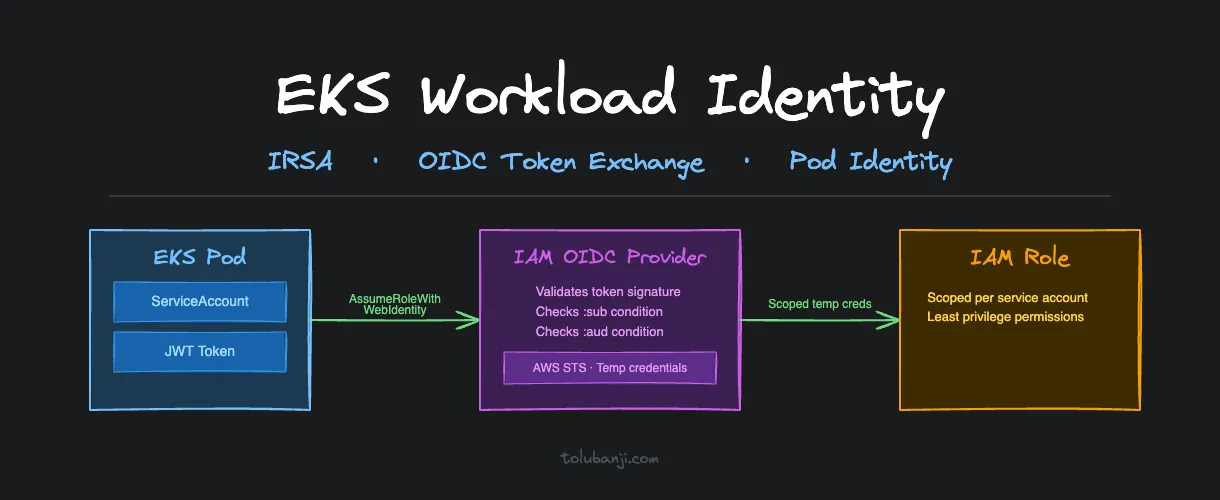
Most EKS clusters start with the same credential model: one IAM key, environment variables, permissions broad enough to avoid revisiting. It works, until you need to audit which service accessed what. Then it breaks down: you need to rotate credentials without restarting every workload, or contain a compromised container that exposes the full IAM role.
These outcomes are the predictable result of treating workload identity as an afterthought.
OIDC and IRSA move AWS access from a shared credential problem to an identity problem. Each service account gets a scoped IAM role. Credentials are temporary. CloudTrail can tell you exactly which workload made each API call.
The Default Credential Model and Why It Breaks
Here’s what most teams do when they first need AWS access from a pod:
# DON'T DO THIS
apiVersion: apps/v1
kind: Deployment
metadata:
  name: dangerous-app
spec:
  template:
    spec:
      containers:
      - name: app
        image: my-app:latest
        env:
        - name: AWS_ACCESS_KEY_ID
          value: "AKIAEXAMPLEKEY123"  # Same key for every pod
        - name: AWS_SECRET_ACCESS_KEY
          value: "secretkey123"       # Exposed in pod specs
The problems stack up fast:
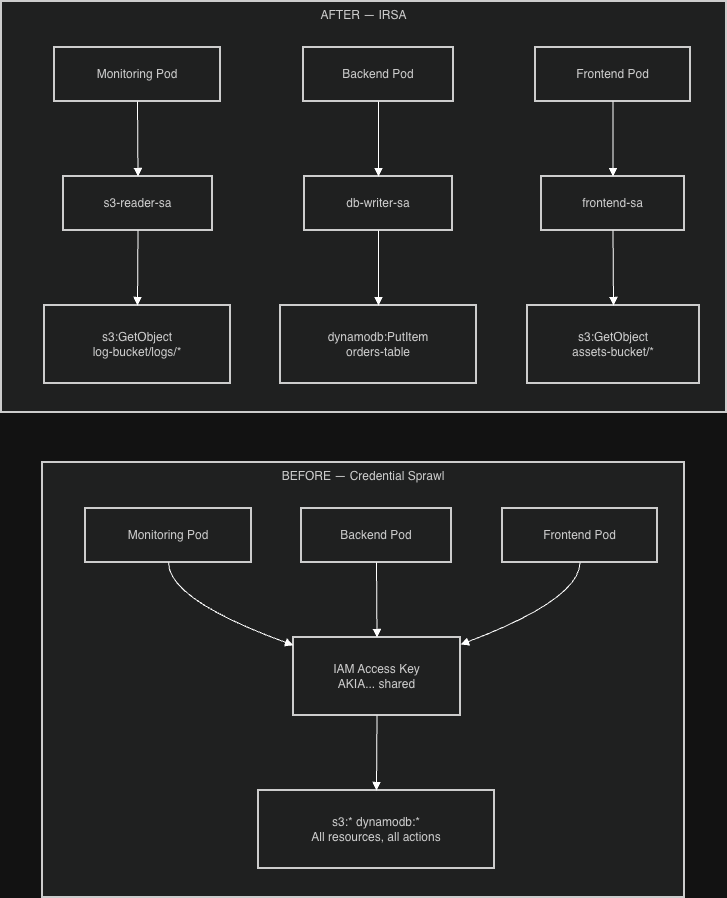
- Credential sprawl: same credentials everywhere, impossible to rotate without touching every deployment
- Over-privileged access: every service gets maximum permissions to avoid scoping complexity
- No audit trail: CloudTrail can’t tell you which service made which API call
- Exposure surface: credentials visible in pod specs, CI logs, environment dumps
- Blast radius: one compromised pod compromises everything
What OIDC and IRSA Solve
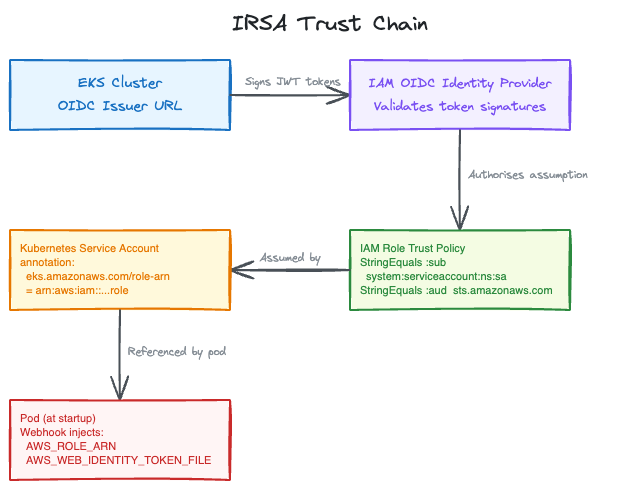
OpenID Connect (OIDC) creates a trust relationship between your EKS cluster and IAM. Your cluster gets a cryptographic identity, an OIDC issuer URL, that IAM can verify. Instead of embedding credentials, pods prove their identity with tokens signed by that issuer.
IAM Roles for Service Accounts (IRSA) extends this trust to individual Kubernetes service accounts. Each workload gets its own scoped IAM role with only the permissions it needs. For example, the monitoring pod gets read-only S3 access to its bucket, and the backup job gets write access to the backup bucket only.
The combination:
- EKS cluster identity → OIDC provider → IAM trust relationship
- Service account → pod identity → scoped IAM role
- API call → temporary credentials via STS → just-in-time access
No embedded secrets, no shared credentials.
How IRSA Works at Runtime
Understanding the token exchange helps when troubleshooting failures.
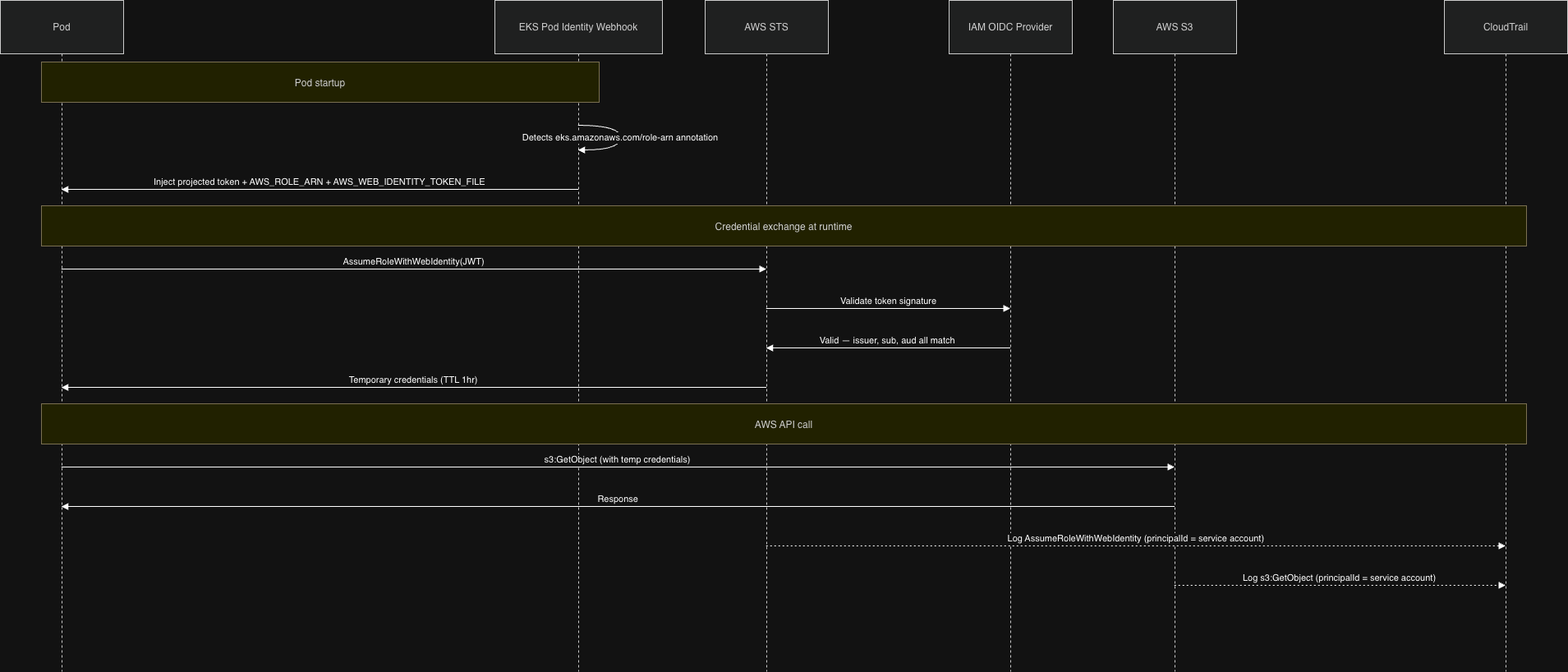
When a pod using an IRSA-annotated service account starts up, the EKS Pod Identity Webhook (a mutating admission controller in the cluster) intercepts pod creation and injects two things:
- A projected service account token mounted at
/var/run/secrets/eks.amazonaws.com/serviceaccount/token - Two environment variables:
AWS_ROLE_ARNandAWS_WEB_IDENTITY_TOKEN_FILE
The SDK reads these automatically. When your app makes an AWS API call, the SDK:
- Reads the JWT token from the mounted path
- Calls
sts:AssumeRoleWithWebIdentity, presenting that token - AWS STS validates the token against the registered OIDC provider
- STS returns temporary credentials (valid for 1 hour)
- The SDK uses those credentials for the API call
CloudTrail logs the call with the service account identity in userIdentity.principalId, so you know which workload made which call.
The Trust Chain
The security guarantee comes from three conditions AWS checks on every call.
- Issuer: is this token from the OIDC provider registered in this account?
- Subject (
:sub): does the token’s service account match the trust policy condition? - Audience (
:aud): was this token meant forsts.amazonaws.com?
All three must match, or the assumption is denied.
Setting Up IRSA
Step 1: Register the OIDC Provider
EKS creates an OIDC issuer URL for your cluster. Register it with IAM:
# Verify your cluster has an OIDC issuer
aws eks describe-cluster --name my-cluster --query "cluster.identity.oidc.issuer"
# Returns: https://oidc.eks.us-east-1.amazonaws.com/id/EXAMPLE123

# Register it with IAM (eksctl handles the thumbprint)
eksctl utils associate-iam-oidc-provider --cluster my-cluster --approve
One-time per cluster; running multiple clusters means each gets its own OIDC provider.
Step 2: Create a Scoped IAM Role
The trust policy specifies which service account can assume this role. The :sub condition is the binding, and it must match system:serviceaccount:NAMESPACE:SERVICE_ACCOUNT_NAME exactly. Case, spelling, and namespace all matter.
{
  "Version": "2012-10-17",
  "Statement": [
    {
      "Effect": "Allow",
      "Principal": {
        "Federated": "arn:aws:iam::123456789012:oidc-provider/oidc.eks.us-east-1.amazonaws.com/id/EXAMPLE123"
      },
      "Action": "sts:AssumeRoleWithWebIdentity",
      "Condition": {
        "StringEquals": {
          "oidc.eks.us-east-1.amazonaws.com/id/EXAMPLE123:sub": "system:serviceaccount:logging:s3-reader-sa",
          "oidc.eks.us-east-1.amazonaws.com/id/EXAMPLE123:aud": "sts.amazonaws.com"
        }
      }
    }
  ]
}
The :aud condition prevents token reuse: a token issued for sts.amazonaws.com cannot be replayed against a different service.
Attach a permission policy giving this role only what it needs:
{
  "Effect": "Allow",
  "Action": ["s3:GetObject"],
  "Resource": ["arn:aws:s3:::my-log-bucket/logs/*"]
}
Step 3: Annotate the Service Account
The eks.amazonaws.com/role-arn annotation tells the Pod Identity Webhook which role to wire up. When the webhook sees it, it injects the token and environment variables:
apiVersion: v1
kind: ServiceAccount
metadata:
  name: s3-reader-sa
  namespace: logging
  annotations:
    eks.amazonaws.com/role-arn: arn:aws:iam::123456789012:role/EKS-S3-Reader-Role
    eks.amazonaws.com/sts-regional-endpoints: "true"
The sts-regional-endpoints: "true" annotation routes STS calls to the regional endpoint instead of the global one. This matters at high pod density: the global endpoint has lower rate limits and higher latency.
Step 4: Deploy Without Credentials
apiVersion: apps/v1
kind: Deployment
metadata:
  name: s3-reader-app
  namespace: logging
spec:
  template:
    spec:
      serviceAccountName: s3-reader-sa
      containers:
      - name: s3-reader
        image: my-app:latest
        env:
        - name: AWS_DEFAULT_REGION
          value: "us-east-1"
        # No credentials. The AWS SDK finds them via AWS_WEB_IDENTITY_TOKEN_FILE.
Your application code doesn’t change; the SDK credential chain handles everything.
Common Problems
Trust Policy Mismatch: The Most Common Failure
You get AccessDenied on AssumeRoleWithWebIdentity because the trust policy condition doesn’t match the actual service account.
Debug it by decoding the token the pod presents:
kubectl exec -it -n logging pod/your-pod -- \
  cat /var/run/secrets/eks.amazonaws.com/serviceaccount/token
Paste that JWT into jwt.io and check the sub claim, which must match your trust policy condition character for character:
system:serviceaccount:logging:s3-reader-saA wrong namespace, name, or case produces the same AccessDenied error without indicating which condition failed.
Token Not Injected
The AWS SDK falls back to the EC2 instance profile, and your pod picks up node-level credentials instead of the scoped role.
This means the webhook didn’t inject the token. Check two things:
- The service account has the
eks.amazonaws.com/role-arnannotation - The pod’s
spec.serviceAccountNamereferences that service account
The webhook only injects on pod creation. If you patch the service account annotation after a pod is running, the pod won’t pick it up until restarted.
Note on automountServiceAccountToken: this flag controls whether Kubernetes mounts the standard service account token (at /var/run/secrets/kubernetes.io/serviceaccount/token). The IRSA token at the EKS path is injected by the webhook independently of this flag, so IRSA works fine even with automountServiceAccountToken: false.
Overly Broad Policies
I start with no permissions and let CloudTrail AccessDenied events tell me what to add. Slower than guessing broad and restricting later, but the result is a much tighter policy. aws iam simulate-principal-policy helps verify a policy before deployment.
Multi-Environment Pattern
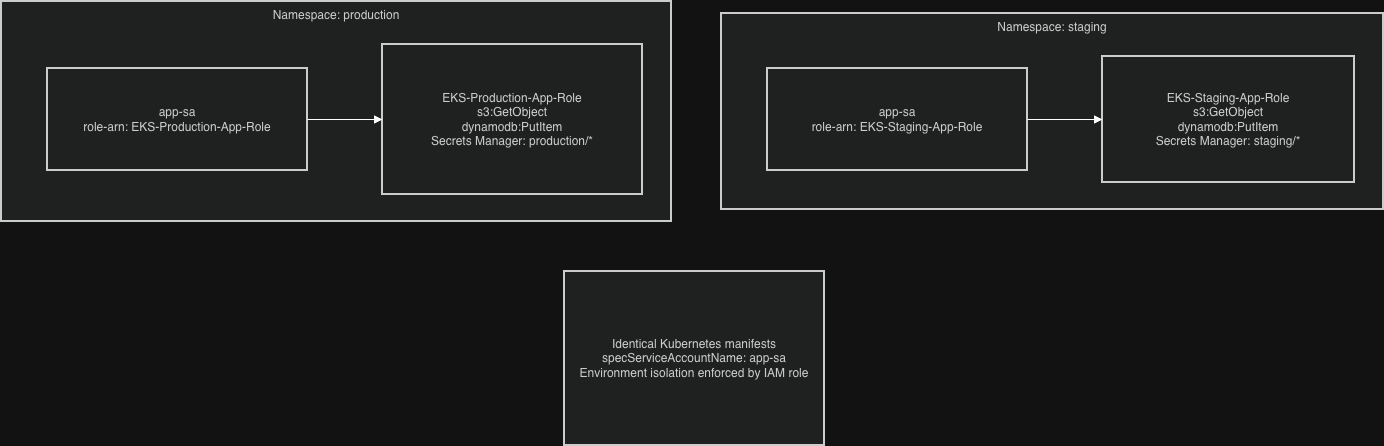
Use the same service account name across namespaces with different IAM roles per environment: identical manifests, environment-specific access control.
# production namespace
apiVersion: v1
kind: ServiceAccount
metadata:
  name: app-sa
  namespace: production
  annotations:
    eks.amazonaws.com/role-arn: arn:aws:iam::123456789012:role/EKS-Production-App-Role
---
# staging namespace
apiVersion: v1
kind: ServiceAccount
metadata:
  name: app-sa
  namespace: staging
  annotations:
    eks.amazonaws.com/role-arn: arn:aws:iam::123456789012:role/EKS-Staging-App-Role
Do not share IAM roles between environments, so a compromised staging pod cannot affect other environments.
Auditing IRSA Usage
CloudWatch Insights query for which service accounts are assuming which roles:
fields @timestamp, userIdentity.principalId, eventName, errorCode
| filter eventName = "AssumeRoleWithWebIdentity"
| stats count() by userIdentity.principalId, eventName
| sort count desc
Set up alerts for failed AssumeRoleWithWebIdentity attempts. Repeated failures usually mean a trust policy misconfiguration breaking a workload, or a pod moved to a new namespace without updating the role condition.
Check unused permissions with IAM Access Analyzer, and remove actions unused in 90 days.
Troubleshooting Checklist
When IRSA breaks:
# 1. Verify the OIDC provider is registered
aws iam list-open-id-connect-providers

# 2. Verify the service account annotation
kubectl describe serviceaccount -n your-namespace your-service-account

# 3. Get inside the pod and check what identity it has
kubectl exec -it -n your-namespace pod/your-pod -- bash
echo $AWS_ROLE_ARN
echo $AWS_WEB_IDENTITY_TOKEN_FILE
aws sts get-caller-identity
If get-caller-identity returns the EC2 node role instead of the service account role, the webhook didn’t inject the token. If it returns the right role but calls still fail, the permission policy is too restrictive; use CloudTrail to find the denied action.
CloudTrail error codes on AssumeRoleWithWebIdentity:
AccessDenied: trust policy conditions don’t matchInvalidIdentityToken: OIDC provider misconfiguration or token expired before the call
IRSA or Pod Identity?
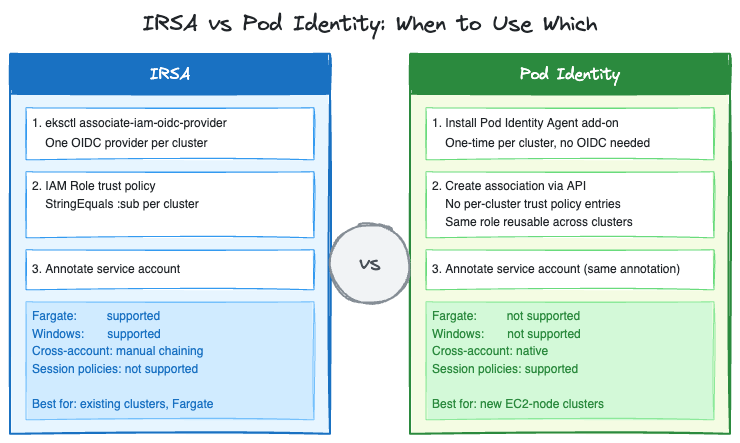
Pod Identity is AWS’s newer mechanism for the same problem. It went GA in November 2023 and has had two significant updates since: cross-account access via IAM role chaining (June 2025), and session policies for fine-grained per-pod scoping (March 2026).
The practical differences:
| IRSA | Pod Identity | |
|---|---|---|
| OIDC provider setup | Required per cluster | Not required |
| Trust policy per cluster | Yes, each cluster needs its own entry | No, one role works across clusters |
| Trust policy size limit | Character-based (2,048 default, 8,192 max). Hits limit at scale because each cluster needs its own OIDC ARN entry | No per-cluster trust entries |
| Cross-account access | Two options: (1) target account registers your cluster’s OIDC issuer as its own provider, or (2) chained AssumeRole | Native, via association APIs |
| Session policies | Not supported | Supported (March 2026) |
| Fargate support | Yes | No |
| Windows nodes | Yes | No |
For new clusters on EC2 nodes, Pod Identity skips the OIDC provider setup and solves the trust policy size problem that bites teams running many services per cluster. For clusters already on IRSA, migration is mechanical, but the operational cost is real. Weigh whether the simplification is worth it.
For Fargate workloads: IRSA is still the only option.
Understanding AssumeRoleWithWebIdentity is still worth it even after moving to Pod Identity. The two mechanisms differ more than they look. With IRSA, each pod calls STS directly via the SDK. With Pod Identity, the node-level EKS Pod Identity Agent makes one AssumeRoleForPodIdentity call to the EKS Auth service for every pod on that node, then serves credentials locally: an architectural change that improves scalability at high pod density, not just a trust policy tweak.
Closing Notes
The key shift: consider what happens when a pod is compromised, not just whether it can do its job. A monitoring pod that can read its specific log bucket is contained. A monitoring pod with s3:* on * is a data exfiltration path.
IRSA adds setup overhead compared to environment variable credentials, but it places that complexity in authentication and authorization, where it’s auditable and reviewable, instead of pushing it into incident response.
Set up CloudTrail filtering and CloudWatch alerts before an incident forces you to. Querying raw CloudTrail under pressure is slower than having the filters ready.