Containers Changed Everything and I Wish I'd Started Sooner
Remember when deploying software meant crossing your fingers and hoping it would work on the production server? When 'but it works on my machine' was the most dreaded phrase in tech? Those days are fading fast, thanks to a technology that's quietly revolutionizing how we build and ship software: containers
I still remember the deployment that made me rethink everything. It was 2020, and I was trying to deploy a Python web app that worked perfectly on my MacBook. The production server ran Ubuntu 16.04 with a different Python version, different libraries, different everything.
The deployment failed spectacularly. Three hours of troubleshooting revealed that a small difference in how the systems handled SSL certificates was breaking everything. “But it works on my machine” became my least favorite phrase that day.
That’s when containers clicked for me, not as an abstract concept, but as the fix for a problem I’d just spent half my Saturday debugging.
The Problem That Drove Me Crazy
Picture a scenario that’ll sound familiar. Your laptop runs the latest macOS. Staging uses Ubuntu 18.04. Production is some crusty CentOS 7 box that hasn’t been updated since 2019, each with different Python versions, different SSL libraries, different everything.
I’ve lost count of deployments that worked in staging but exploded in production, usually at the worst possible moment: during a demo to the CEO, or right before a critical customer launch.
Containers solved this nightmare. They package your application with everything it needs to run, creating a bubble of consistency that travels from laptop to production unchanged.
What Is a Container?
Here’s the analogy that made it click for me. You know those shipping containers that carry stuff across oceans? Same concept, but for software.
A container bundles your application with everything it needs: code, runtime, libraries, system dependencies, everything. Your app gets its own private universe where all the pieces fit together.
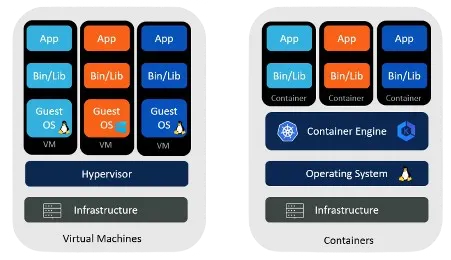
The clever bit: containers aren’t like virtual machines that need their own operating system. They share the host OS kernel while keeping applications isolated, like roommates who share the kitchen but have their own locked bedrooms.
That means containers start in seconds instead of minutes, use megabytes instead of gigabytes, and run dozens on the same server without breaking a sweat.
The Three Things That Make Containers Work
Containers have three main pieces that work together. Nothing fancy, just solid engineering.
Container Engine: The workhorse. Docker is the famous one, but there are others. The engine builds containers, runs them, and keeps them from stepping on each other, like a good apartment manager: everyone gets their own space but shares the building’s utilities.
Container Images: Your blueprints. An image captures everything your app needs in one package, and once built, it never changes. What works on your laptop works exactly the same in production. No more “but it worked on my machine” surprises.
Container Registry: Think GitHub but for container images. Docker Hub is the biggest one. Need a database? Someone’s already built an image for that. Need to share your custom setup? Push it to a registry and your team can pull it down instantly.
That’s it: build an image, store it in a registry, run it with an engine. Simple enough to explain to your manager without losing them in jargon.
Containers vs. Virtual Machines: Settling the Debate
You might be wondering, “Don’t virtual machines already do this?” Fair question, and the difference matters.
Virtual machines are like building an entire house for each application: a full operating system, virtual hardware, and your application on top. Comprehensive, but heavy. Starting a VM can take minutes, and each one might consume gigabytes of memory just for the operating system.
Containers are more like efficient apartments in a well-designed building. They share the building’s infrastructure (the host OS kernel) but keep their own private space. A container can start in seconds and might only need megabytes beyond what the application itself requires.
This efficiency isn’t just about saving resources, it’s about agility. When you can spin up a new instance in seconds rather than minutes, it changes how you think about scaling, testing, and deployment. Running 100 copies of your application for a load test suddenly becomes practical, not prohibitive.
The Practical Impact: Why Containers Matter
Take Netflix. They run hundreds of microservices, each potentially needing different versions of various libraries and tools. Without containers, managing this would be a nightmare. With them, each service lives in its own optimized environment, and deploying updates becomes as simple as swapping out images.
Or consider a startup I worked with that was struggling with deployment consistency. Their application worked perfectly in development but crashed mysteriously in production. The culprit was a different version of a system library. After containerizing, these problems vanished: the same environment went from the developer’s laptop through testing and into production.
Containers also enable new architectural patterns. Microservices, where applications are broken into small, independent services, becomes practical when each service can be containerized. You can update one service without affecting others, scale specific components based on demand, and even mix programming languages, all because containers provide a consistent, isolated environment.
The Container Ecosystem: More Than Just Docker
While Docker popularized containers and remains dominant, the ecosystem has grown rich and diverse. Docker made containers accessible by wrapping complex Linux kernel features in a friendly package, and its success spawned an entire industry.
But Docker isn’t alone. CoreOS introduced rkt (pronounced “rocket”) as an alternative focused on security and standards compliance. Linux Containers (LXC) predates Docker and offers lower-level control. Podman emerged as a “daemonless” alternative, addressing some of Docker’s architectural concerns.
Each has its strengths. Docker excels at developer experience and has the largest ecosystem. Rkt prioritizes security and composability. LXC offers fine-grained control. Whatever your needs, there’s a fit.
These technologies have also standardized around common formats and APIs. The Open Container Initiative ensures a container image built with one tool can generally run with another, which prevents vendor lock-in and encourages innovation.
Containers in Practice: Transforming Development Workflows
The payoff shows up once containers become part of your daily workflow. In CI/CD pipelines, they ensure the same environment used for development gets used for testing and deployment too.
Teams can share complete environments as easily as sharing code. New members get a fully configured dev environment running with a single command: pull the image and start coding, no more spending days setting up tools and dependencies.
Testing gets more reliable too. Each run starts with a fresh container, so previous tests can’t contaminate results, and you can run tests in parallel without conflicts. Integration testing gets simpler when you can spin up an entire stack of services in containers, creating a miniature production environment on demand.
For deployment, containers enable strategies that used to be too complex for most teams. Blue-green deployments, running two versions side by side before switching traffic, become straightforward. Canary releases, gradually rolling out new versions to subsets of users, are just a matter of adjusting which containers receive traffic.
The Path Forward: Preparing for Kubernetes
As powerful as containers are, managing them at scale brings new challenges. With dozens or hundreds of containers across multiple servers, you need orchestration. How do you distribute containers efficiently? Handle failures when a server goes down? Manage updates without downtime?
That’s where Kubernetes comes in. If containers are like shipping containers, Kubernetes is the port management system that ensures they get where they need to go, handling scheduling, scaling, networking, and storage.
That’s a story for our next article. For now, understanding containers gives you the foundation to see why orchestration becomes necessary.
Your Container Journey Starts Here
Containers represent a fundamental shift in how we think about software deployment. They’re not just a technical improvement, they enable new ways of working, new architectures, and new possibilities.
The beauty of containers is that you can start small. Install Docker on your laptop and containerize a simple application. Feel how liberating it is to package an app once and know it will run anywhere, and watch your deployment process get simpler and more reliable.
From there, the path leads to more advanced topics: optimizing container images for size and security, managing secrets and configuration, monitoring containerized applications. Each question builds new capability.
What’s Next?
In our next article, we’ll explore Kubernetes, which takes containers from useful to essential at scale, solving the orchestration challenge and enabling patterns like self-healing applications and automatic scaling.
For now, take a moment to appreciate how far we’ve come. From the dark days of “works on my machine” to a world where applications move smoothly across any environment, containers have delivered on technology’s promise to make our lives simpler while letting us build more.